
Report-Engine FAQ

This section contains a general FAQ of the CodeHarbor Report-Engine for Zabbix. Both the SaaS and Self-Hosted versions are covered in this FAQ.
What does CodeHarbor Report-Engine for Zabbix do?
Section titled “What does CodeHarbor Report-Engine for Zabbix do?”The CodeHarbor Report-Engine for Zabbix allows you to create recussing and insightfull business reports from all monitoring data of your Zabbix Server.
By using the built in Zabbix API code, the required data is gathered and displayed in an insightfull way. this allows you to easely create and recreate business insights to infor your staff, customers or leadership team.
The different data blocks that can be added allow a correct longterm view of the load and usage of your resources. These insights allow you to optimise the resorce allocation and usage, thus saving precsious resources.
by scheduling your reports, you are informed using consistend automated data, saving recussing time on creating and recreating reports.
How does the Report-Engine work?
Section titled “How does the Report-Engine work?”The CodeHarbor Report-Engine for Zabbix works by connecting to your Zabbix Server, and fetching data using the Zabbix API options.
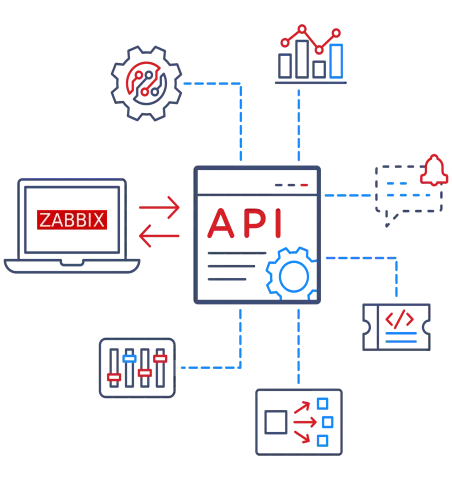
Once connected, you can report data of all your monitored hosts-groups and hosts*. Data like graphs, single stats, SLA’s can be defined and displayed in an orderly fashion. Upon execution, data is fetched then processed and formatted to an easy usable PDF format. This file is either saved to your personal repository and/or also mailed to any recipient of your choise. You can also schedule your reports, this way your reports are created saved and mailed on a recurring basis.
- The Defined Zabbix API user needs to have the required permissions to access the desired data.
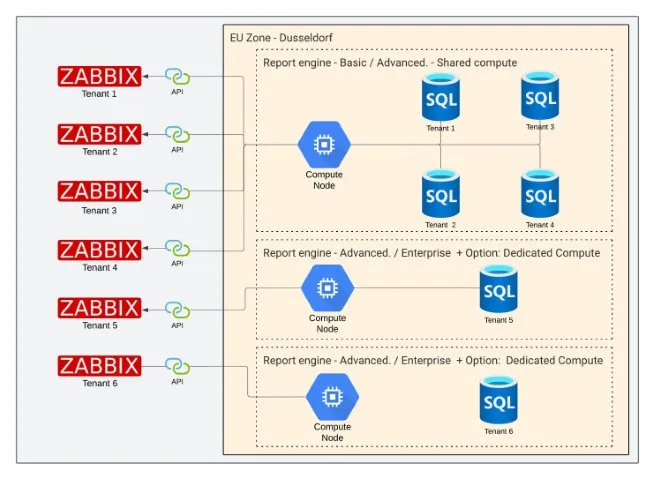
When Using the SaaS subscription, the Report-Engine application is hosted and managed by CodeHarbor in it’s secure cloud infrastructure. All processing and data handling is done on the CodeHarbor servers. The connection to your Zabbix server is secured using firewalls and encrypted connections.
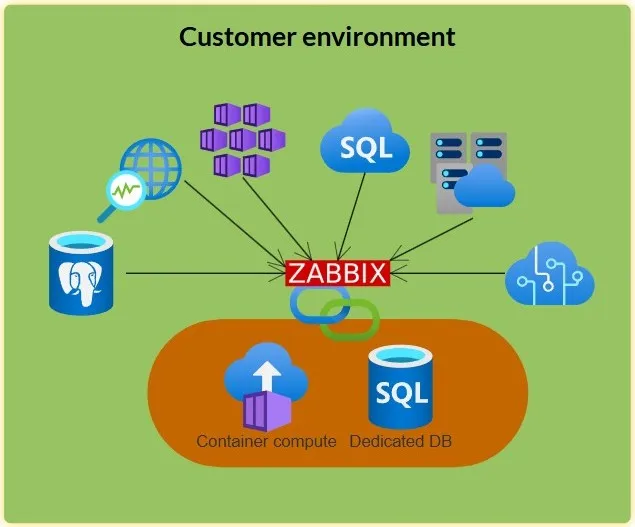
When using the Self-Hosted (On-Prem) subscription, the Report-Engine application is installed and managed in your local infrastructure. All processing and data handling is done on your local servers. The connection to your Zabbix server is done using local network connections.
Supported Zabbix Versions
Section titled “Supported Zabbix Versions”We aim to follow the stable Zabbix releases, currently, the Report-Engine for Zabbix supports following versions:
- Zabbix Server 6
- Zabbix Server 7
- Zabbix Cloud*
*Zabbix Cloud is not supported in Free SaaS subscription.
What is displayed in the Reports
Section titled “What is displayed in the Reports”The content of your reports is fully dependent on your requirements.
The cornerstones of the Report content are the different blocks, that allow you to get specific data from your Zabbix Server. The available* blocks are:
- Table of Content
- Host Inventory
- Active problems
- Problem History
- Titles
- Free Text
- Page Break
- Graphs default Date
- Graphs Custom Date
- Single Stats
- SLA
See our blocks documentation for more information on the different blocks and their usage.
*Depending on your subscription. See “Pricing” for all features.
How does Report-Engine connect to my Zabbix Server?
Section titled “How does Report-Engine connect to my Zabbix Server?”Without VPN connection
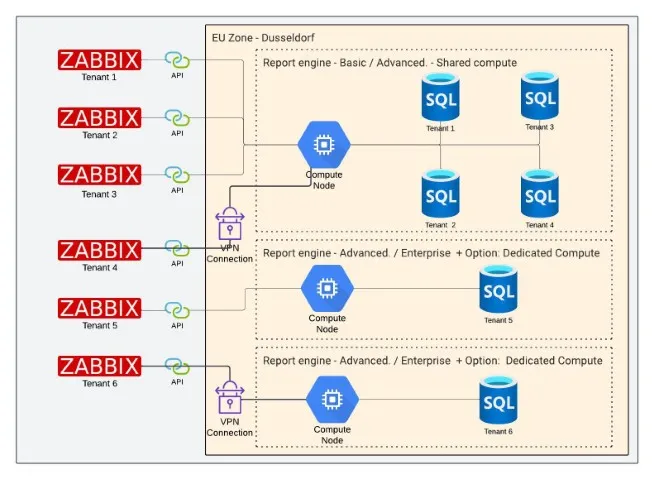
Section titled “Without VPN connection”The CodeHarbor Report-Engine for Zabbix connects to your Zabbix server, over the internet trough port “443” Https, to launch user / Pass, and access the API gateway of your Zabbix Server.
With VPN connection
Section titled “With VPN connection”A SSLVPN connection tunnel is created from the CodeHarbor Firewall to your Zabbix Server. Trough this secure tunnel, all data is transfered encrypted and safe.
What data is stored when using the Report-Engine?
Section titled “What data is stored when using the Report-Engine?”The CodeHarbor Report-Engine application only stores meta-data in your secure dedicated database. this data is:
- User login data to connect to your account.
- Login data to connect to your Zabbix Server.
- Report configuration data.
- Schedule configuration data.
- Style configuration data
For On-Prem:
- Mail-server connection data
All Zabbix host and alerting data, required to create a report, are fetched upon execution of your report. Once the report is created and sent, all Zabbix monitoring data is flushed.
Depending on your subscription, result reports containing processed data may be saved in your personal Report history
Report-Engine SaaS versus Report-Engine Self-Hosted (On-Prem)
Section titled “Report-Engine SaaS versus Report-Engine Self-Hosted (On-Prem)”The Report-Engine SaaS is a subscription model, where the Report-Engine, and it’s processing is managed by CodeHarbors Cloud servers. In this model, you have the ease of using a managed solution without any of the local install or maintenance issues. Depending on your subscription, you can add 1 or more Zabbix servers to your solution. All connections are secured by the CodeHarbor Firewalls.
The Report-Engine On-Prem is a local installation subscription. Upon subscribing, you will receive installation files and lisence key’s to install the Report-Engine solution in your local infrastructure. The On-Prem solution is created especially for customers using an airgapped environment. See our “Self-Hosted Requirements” for more information on the set-up.
SaaS Subscription models
Section titled “SaaS Subscription models”The CodeHarbor Report-Engine SaaS comes in 3 different subscriptions.
- Free
- Allows you to get aquainted with the Report-Engine and create several basic reports
- Advanced
- Offering all the features of a free subscription, but is expanded with schedules, default timing Bloxks and e-mail support
- Professional
- All the bells and whisles. you can use all features of the Report-Engine.
For the specs of our different subscription models, check our Features for all specifications. Pricing for all subscription models.
Where is the data processed
Section titled “Where is the data processed”The different CodeHarbor Report-Engine for Zabbix application is currently running on our servers, located in Dusseldorf, Germany. Currently our team is working on expanding our footprint to multiple continents. Subscribe to our Newsletter to stay informed on al the latest news and expansions.
Is my data secured?
Section titled “Is my data secured?”Yes. @CodeHarbor we value the safety of all data.
All data is kept in subscription-dedicated encrypted databases.
All CodeHarbor and Report-Engine systems are only accessible trough login, and are all kept behind multiple layers of security. Firewall, Data encryption, and server protection layers.
Requirements
Section titled “Requirements”Depending on the chosen deployment model, different requirements are set.
Following requirements are set to use the Report-Engine SaaS
- Supported Zabbix Server
- API enabled Zabbix User
- Firewall access from CodeHarbor to your Zabbix Server
Following requirements are set to use the Report-Engine Self-Hosted (On-Prem)
- Operating system:
- Debian 12, 13
- Ubuntu 25.04, 25.10
- RHEL 9, 10
- Minimum Server Resources:
- 2 vCPU
- 4GB Memory
- 40GB disk space
- Installed software:
Can Report-engine Self-Hosted mail my Reports?
Section titled “Can Report-engine Self-Hosted mail my Reports?”Yes, The CodeHarbor report-Engine On-Prem allows you to define your local mail-server and user. Using this server, the Report-Engine will mail all scheduled reports to the recipient of your choise.
Self-Hosted Installation Guide
Section titled “Self-Hosted Installation Guide”Upon purchase, the CodeHarbor Report-Engine On-Prem download can be found in your MyAccount page, under downloads. A lisence key* is also available at this location.
A full installation guide is available in our Installation Guide.
*Lisence key is required for fully functional installation.
Can I connect multiple Zabbix Servers?
Section titled “Can I connect multiple Zabbix Servers?”The Standard CodeHarbor Report-Engine set-ups are Sigle tenant.
However, the Enterprise solution offers you the option to work multi tenant, hence multiple Zabbix Servers, feel free to ask a quote for your desired multi Tenant set-up.
How does Report-Engine connect to my Zabbix Server?
Section titled “How does Report-Engine connect to my Zabbix Server?”Without VPN connection
Section titled “Without VPN connection”The CodeHarbor Report-Engine for Zabbix connects to your Zabbix server, over the internet trough port “443” Https, to launch user / Pass, and access the API gateway of your Zabbix Server.
With VPN connection
Section titled “With VPN connection”A SSLVPN connection tunnel is created from the CodeHarbor Firewall to your Zabbix Server. Trough this secure tunnel, all data is transfered encrypted and safe.