
Getting started
Getting started with the Report-Engine
Section titled “Getting started with the Report-Engine”The CodeHarbor Report-Engine for Zabbix is a solution that allows you to create your business reports. It is our aim to make the solution as user-friendly as possible. should anything not work according to your liking, please let us know, we truly appreciate your feedback. every request will be reviewed and you will be informed of the outcome.
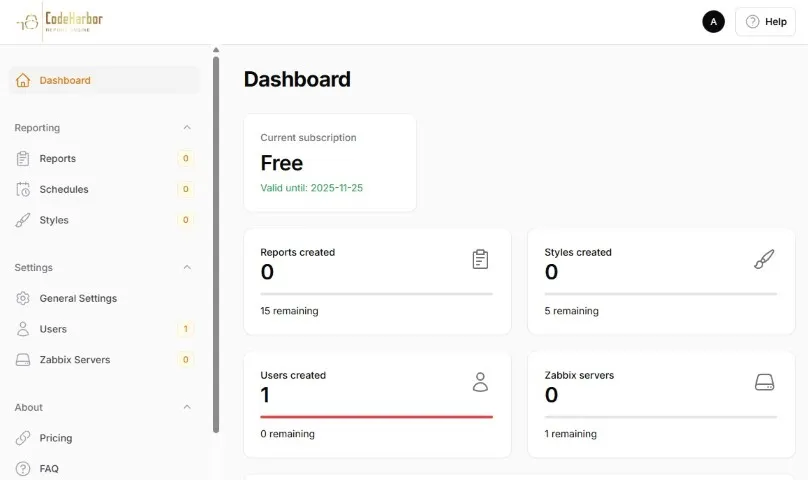
Your CodeHarbor Report-Engine dashboard allows you to have a complete overview of your subscription. From this page you can create your Zabbix server connections, Styles, Reports and Schedules. The dashboard also allows you to:
- Define a custom sub-domain for your Report-Engine access
- Define and review different users
- Offer direct access to our Community and documentation.
Follow the following 4 steps to enjoy the full power of the Report-Engine.
Each step is linked to a more detailed guide, explaining the functions in detail.
1. Connect your Zabbix server
Section titled “1. Connect your Zabbix server”First things first, you should connect your Report-Engine account to your Zabbix Server. CodeHarbor’s Report-Engine uses API calls to search and fetch all data.
Connect Zabbix Server
2. Create your Style
Section titled “2. Create your Style”In the Styles, you can personalize your reports. The Style allows you to set different parameters.
- Parameters:
- Font type
- Font Color
- Font Size
- Table of Content format
- Hide disabled hosts
- Graph modes (dark / light)
These parameters can be used in all your reports, giving your reports a uniform look and feel.
Create Style
3. Create Reports
Section titled “3. Create Reports”Now the real work begins.
In the Reports section you can create any report you like.
Depending on your subscription, you can sometimes save only a limited number of reports.
Every report can be built and customized with the data you need. Allowing you to create different reports for different environments or purposes.
Be sure to read the “Create Report” section for more information on how to create your report.
by clicking the dots, on the right side of your report, you can view the history, or run a report on demand.
Create Report
4. Create Schedules
Section titled “4. Create Schedules”Once you have created your report, it’s time to schedule your report runs. You can schedule your reports on different periodicity’s.
- Daily
- Weekly
- Monthly
- Yearly
All scheduled are executed the first day of the period, between 00h and 02h. These reports are mailed to your defined recipients and are available for download in your report history
Create Schedules
5. Enjoy your reports
Section titled “5. Enjoy your reports”Once you have created and scheduled your report, it’s time to enjoy the results. The CodeHarborReport-Engine will now send you all your business reports as scheduled.